Setup
Check build prerequisites, install what is missing with your permission, scan your drives for GGUF models already on disk, and prune registry entries whose files are gone.
What it does
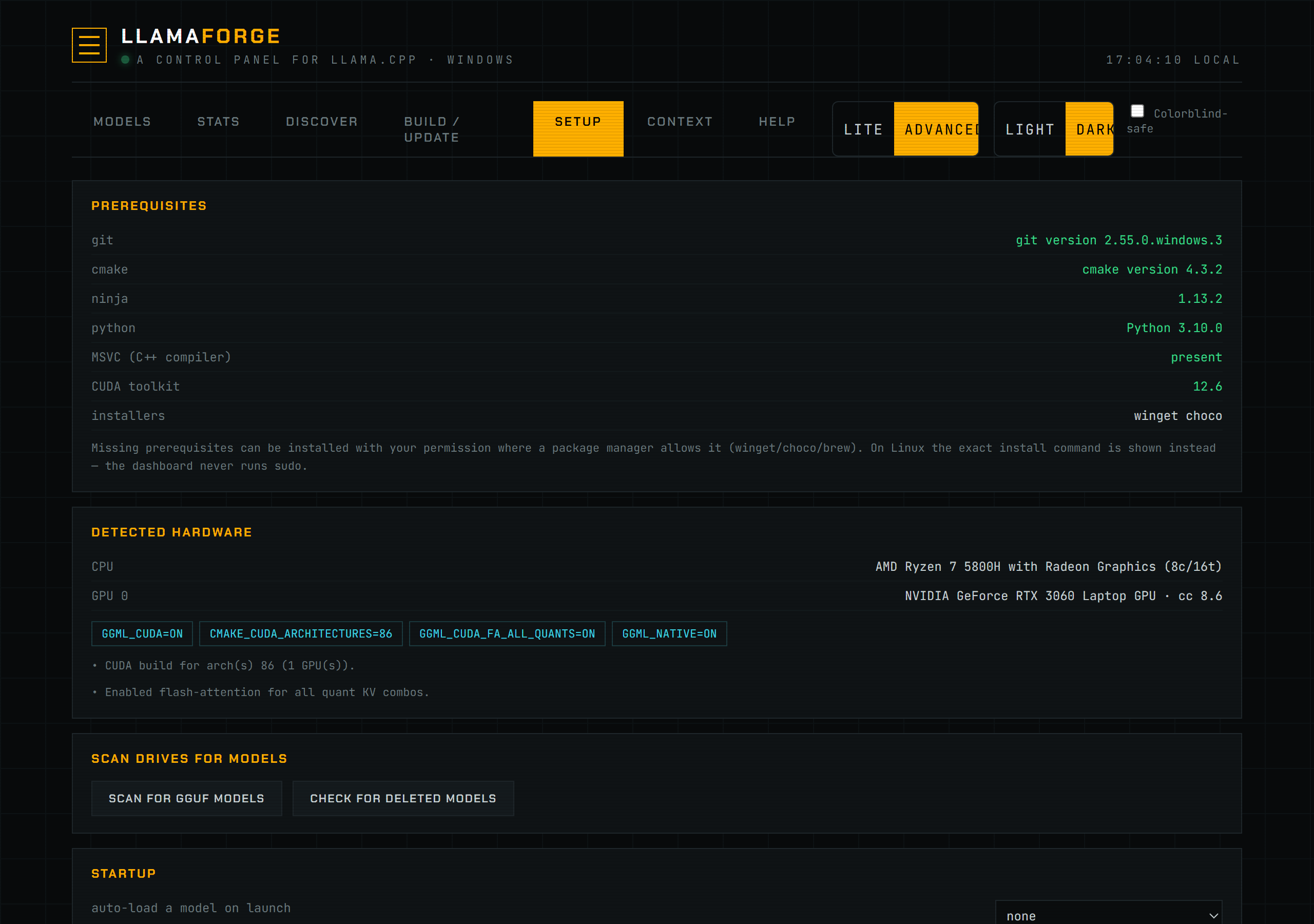
The Setup tab reports on four independent things, each backed by its own backend module.
Prerequisite detection. backend/prereqs.py checks for four command-line tools — git, cmake, ninja, and python (via shutil.which, running --version to confirm and capture the installed version) — plus the platform C++ compiler and the CUDA toolkit. On Windows, the compiler check (find_msvc()) shells out to vswhere.exe to locate an MSVC install with the C++ desktop workload, falling back to a glob for cl.exe under Program Files\Microsoft Visual Studio. On macOS/Linux it looks for clang++ or g++ on PATH. CUDA detection reads nvcc --version (or $CUDA_PATH) and is skipped entirely on macOS, where Metal is used instead.
Installing missing tools. Which package manager runs depends on the OS, verified directly in prereqs.py:
- Windows:
install()trieswinget install --id <pkg> -e --accept-source-agreements --accept-package-agreementsfirst; ifwingetisn't onPATHor the install fails, it falls back tochoco install <pkg> -y. - macOS:
install()requires Homebrew and runsbrew install <pkg>— nosudoneeded. - Linux: the dashboard never runs
sudo.install()returnsok=Falsewith the exact command to paste into a terminal (sudo apt-get install -y <pkg>,sudo dnf install -y <pkg>, orsudo pacman -S --noconfirm <pkg>, picked byosplat.linux_pkg_manager()probingapt-get→dnf→pacmanin that order).
Each tool in prereqs.TOOLS carries its own winget/choco/brew/pkg identifiers and a fallback download URL, used whichever path applies. _can_auto_install() gates the Install button: on Windows it needs winget or choco present; on macOS it needs brew; on Linux the button never appears — only the hint.
After a successful install, the running process's PATH is refreshed from the registry (osplat.refresh_path(), Windows-only) and the tool is re-probed, so a freshly installed ninja or cmake is detected immediately. Only if it still isn't visible does the result ask you to restart LlamaForge — the old behavior (always MISSING until a restart) is gone.
Folder or drive scan for GGUFs. backend/scanner.py's scan() (via POST /api/scan) walks the folders entered in Setup, one path per line. Saving the list persists it as model_dirs; clearing it restores the platform defaults. Those defaults are every fixed drive letter on Windows (GetLogicalDrives + GetDriveTypeW == DRIVE_FIXED, so removable/network drives are excluded), $HOME plus /Volumes on macOS, and $HOME plus any of /mnt, /media, /srv, /data on Linux. The scanner finds .gguf files at least 50 MB while skipping recycle bins, .git, and .trash folders. Multi-shard GGUF sets collapse to their first shard, mmproj* files attach to their sibling model instead of appearing standalone, mtp-* speculative draft sidecars attach as a spec-draft-model (see models.ini Format), and files with embed in the name are flagged as embedding endpoints. Confirmed results are written into models.ini via POST /api/scan/apply.
Registry prune. POST /api/scan/prune ("Check for deleted models") takes a list of model IDs, re-checks each one's model path in models.ini against disk, and — only for entries whose file no longer exists — unloads it from the router if currently loaded, then removes its section from models.ini with config.remove_section(). An entry whose file has reappeared since the check is left alone. This edits models.ini only; it never touches files on disk.
The tab also surfaces hardware.recommend()'s detected CPU/GPU (shared with the Build tab), lets you pick a favourite model to auto-load on launch (auto_load_model in config.json), and — on Windows — the vLLM/WSL2 install flow described in vLLM Backend.
How to use it
- Open the Setup tab. Prerequisites lists Git, CMake, Ninja, Python, your C++ compiler, and CUDA (if applicable), each marked present/missing with its detected version.
- Click Install next to a missing tool to install it with your OS's package manager (Windows: winget, falling back to choco; macOS: Homebrew). On Linux, copy the shown command into a terminal yourself — the dashboard never runs
sudo. - Review Detected Hardware — your CPU and any GPUs found, shared with the Build tab's flag recommendations.
- Enter one model folder per line and optionally click Save folders, then click Scan for GGUF models. Leave the list blank to scan all fixed drives (or
$HOMEplus mounted volumes); review the results and apply the ones you want registered. - Click Check for deleted models to find registry entries whose backing file no longer exists on disk, then prune the ones you confirm.
- Optionally pick a model under Startup to auto-load when LlamaForge launches.
Network Access
The Network Access card controls the llama.cpp router, never the dashboard: the panel and management API stay on 127.0.0.1. Choose This computer only for the router's 127.0.0.1 scope or Devices on my local network for its 0.0.0.0 scope. LAN selection requires a usable key before Apply is enabled.
Choose one unambiguous key action: Keep current key, Generate / rotate, Replace, or Remove. Remove is available only with local access; moving from LAN back to local otherwise retains the key. Generating or replacing over an existing key, and removing an existing key, each require confirmation. Rotation warns because clients using the previous key will stop authenticating. A generated key is returned only by that explicit Generate action: it starts masked, can be copied without displaying plaintext, and its one-time reveal expires after 30 seconds. Retry, Done, navigation, or a Setup rerender clears the value and its copy closure.
Older printable LAN keys are retained as protected_legacy so an upgrade does not force an immediate client outage, but the card recommends rotation. Unsupported manual hosts and LAN configurations with an absent or invalid key are displayed as unsafe_legacy, not silently rewritten. Repair them by generating/replacing the key or returning to local-only; new router starts and restarts remain blocked until then.
Applying saves a validated safe configuration and requests a restart. The status separates saved settings from observed listener state: a port being occupied does not prove that it belongs to LlamaForge or enforces the expected key. If restart fails, the saved protected configuration remains, but the router is stopped or unverified rather than claimed as active: “A protected configuration was saved, but the router is stopped; LAN protection is not currently active or verified.”
Connect an Agent
Changing an agent or model selection does not fetch credentials. Press Show configuration to make the explicit POST preview, then choose Apply only if you want LlamaForge to write the agent's local config file. Agent setup supports the active llama-family backend; vLLM agent setup is deferred. Context injection for Codex and pi uses the loopback panel endpoint, so it is local-machine-only.
Screenshot
Reference
| Concept | Source | Behavior |
|---|---|---|
| Prereq detection | prereqs.status() | git, cmake, ninja, python via shutil.which + --version; C++ compiler and CUDA toolkit detected separately. |
| Windows install | prereqs.install() | winget install --id <id> -e ..., falling back to choco install <id> -y if winget is absent or fails. |
| macOS install | prereqs.install() | brew install <pkg> — requires Homebrew, no sudo. |
| Linux install | prereqs.install() | Never runs sudo; returns the exact apt-get/dnf/pacman command to run yourself. |
| Drive scan roots | scanner.list_drives() | Windows: all fixed drive letters. macOS: $HOME + /Volumes. Linux: $HOME + any of /mnt, /media, /srv, /data that exist. |
| Selected scan roots | config.json: model_dirs | One or more directories persisted from Setup. An explicit empty list selects the platform defaults. |
| GGUF discovery | scanner.find_ggufs() | .gguf files ≥ 50 MB; skips recycle bin/.git/.trash; collapses multi-shard sets; attaches mmproj and mtp-* siblings; flags embed files. |
| PATH refresh after install | osplat.refresh_path() | Windows-only; re-reads PATH from the registry so a just-installed tool is detected without a restart. |
| Registry prune | POST /api/scan/prune | Removes a models.ini section only if its model file no longer exists on disk; unloads it from the router first if loaded. |
| Auto-load | config.json: auto_load_model | Model ID to load automatically once the router is ready after launch. |
Troubleshooting
If Install doesn't appear for a missing tool, no supported package manager was found for your OS (Windows without winget or choco, macOS without Homebrew) — use the tool's download URL shown next to it instead. If a Windows install reports "winget failed" then falls through to choco, check the combined output shown in the toast/log for the underlying error (often a source-agreement prompt or an already-installed conflicting version). If the drive scan finds nothing on Windows, confirm your models sit on a fixed (non-removable, non-network) drive — list_drives() skips those by design. If Check for deleted models reports an entry you know still exists, verify the model path in models.ini matches the file's real location; a moved file reads as "deleted" until you re-scan and re-apply it.
If Network Access says settings were saved but router start is not verified, read the displayed start error and router log, then use Retry after fixing it. The port check only observes a listener; it cannot prove listener ownership or authentication. An unsafe_legacy warning means LlamaForge deliberately refused to start/restart until the configured host and key are repaired.
See also Build & Update for the same hardware detection used to pick CMake flags, and vLLM Backend for the WSL2 install flow shown at the bottom of this tab on Windows.