Auto-Forge
Auto-Forge finds the fastest way to run one model on your GPUs, measured on your machine rather than guessed. It tries GPU placements, KV cache types and speculative drafters in a private sandbox, benchmarks the ones that load, checks that drafters don't change the answers, and offers the winner as a one-click edit to models.ini that you can undo.
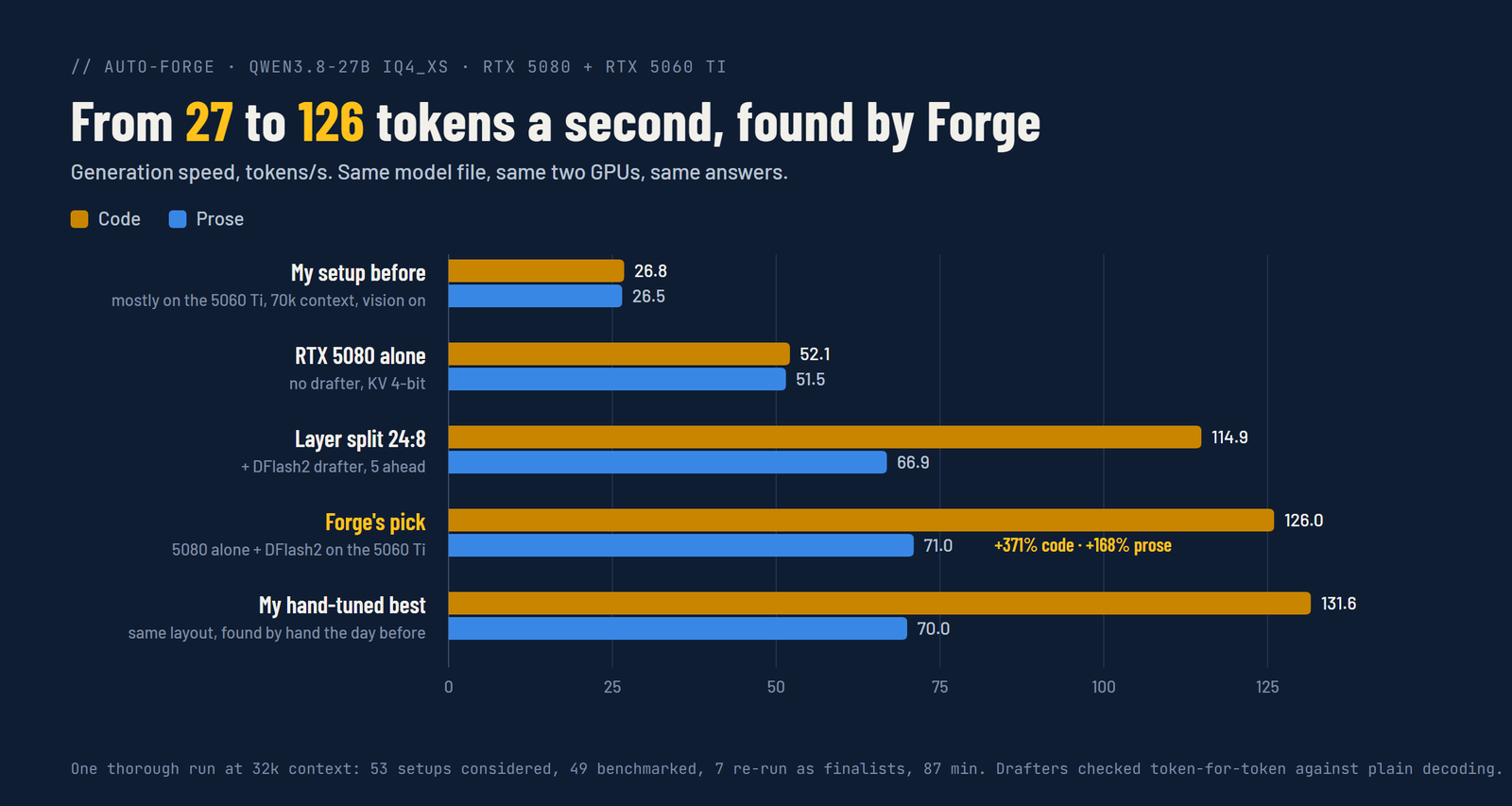
What it found here
On Qwen3.8-27B (IQ4_XS) with an RTX 5080 and an RTX 5060 Ti on PCIe x4, my own setup ran the model almost entirely on the 5060 Ti (the slower card), with 70k context and vision on, at 26.8 tokens/s on code and 26.5 on prose. A thorough Auto-Forge run (coding, 32k context, vision allowed off) considered 53 setups, benchmarked 49 of them, re-ran 7 finalists and took 87 minutes. Its pick was:
- the model on the 5080 alone,
- a DFlash2 drafter on the 5060 Ti, drafting 5 tokens ahead,
- 4-bit KV cache (what the setup already used), 32k context, no vision projector.
That ran at 126.0 tokens/s on code and 71.0 on prose (+371% and +168%). Part of that is simply the faster card: the 5080 alone without a drafter did 52.1 and 51.5, so the drafter roughly doubled code speed on top of that. Forge was asked for 32k context; my old setup kept 70k. My best hand-tuned result, found the day before with the same layout, was 131.6 and 70.0. These are numbers from one machine and one model; your gains depend on your GPUs, the model and whether a drafter exists for it.
Using it
Open a model's row in Models. Next to the editor is the Auto-Forge line:
- What you use it for: Coding, Chat, Long documents or Agents. This sets how the speeds are weighed (coding cares most about code generation, long documents about prompt processing and speed deep into the context).
- Context to keep: 8k to 128k. Every candidate has to hold this much context.
- Quick or Thorough: thorough tries more placements, more drafters and more draft windows, and re-runs more finalists. A thorough run on a 27B model took 87 minutes here; quick is shorter.
- Allow lossy KV: also try 8-bit and 4-bit KV cache. Faster, or more context in the same VRAM, but answers can change slightly, and the result says so.
- Try without vision: also try each placement without the vision projector (
mmproj). On a tight GPU that can free the room a drafter needs. Applying such a result turns vision off through the usual vision switch, so turning it back on is one click.
Press Forge. While it runs, LlamaForge has the GPUs to itself: every loaded model is unloaded first and loaded again when the run ends, also when it's cancelled or fails. The row shows the stage, which candidate is loading and a progress bar, and Cancel stops it. A cancelled run with the same settings picks up where it stopped.
How it decides
- Fit. Each candidate gets a VRAM estimate from the GGUF's own layout first, so setups that can't fit are skipped without loading. The rest are loaded in a sandbox
llama-serveron port 8160 and up. A load that runs out of memory or spills to system RAM is caught from the server's log and counted as a miss, with the reason. - Staged search. Plain placements first (one GPU, the other, layer and tensor splits), then drafters on the best few placements, then other draft windows on the best drafters only. That keeps a run to about an hour instead of a night.
- Speed. Each candidate gets a short round of code, prose and summary prompts. The finalists (and your current setup) get a longer round on fresh prompts, and those numbers decide.
- Sanity. A drafter has to produce the same tokens as the same setup without it, token for token at greedy decoding. One that diverges can't win.
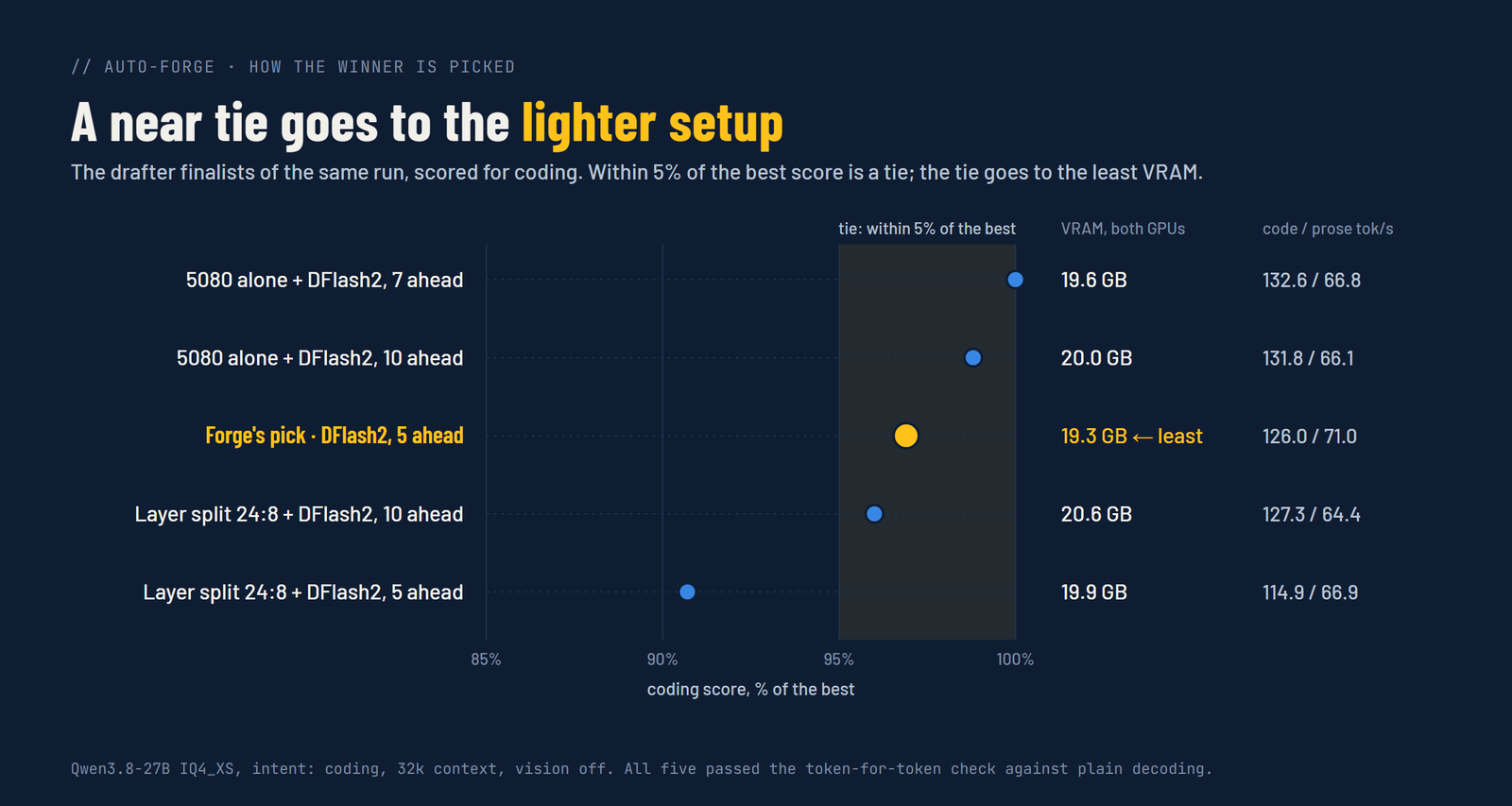
- Ranking. Each finalist gets a score weighted for what you picked. Anything within 5% of the best score counts as a tie, and the tie goes to the setup using the least VRAM, then the one with fewer moving parts.
Apply and Undo
Apply writes only what Forge changed from the setup it started with into the model's models.ini section, and reloads the model. Keys you didn't ask it about, and keys in [*], are left alone. It remembers what it replaced, so Undo puts your old values back. The model editor shows the new values right away.
Share
When the winner beats your current setup, Share opens a card you can post: before and after tokens a second, the speedup, your GPU models, the context size and whether the answers stay the same. Download image saves it as a 1200x630 PNG (the size Reddit, X and GitHub previews use); Copy markdown gives a table plus the flags Forge chose, ready for a forum post or an issue. Neither holds a file path, API key or host: only the flags Forge decides, with each model file cut to its name.
Good to know
- Needs at least one NVIDIA GPU (VRAM is read with
nvidia-smi). - Drafters are found next to the model and in its neighbouring folders: DFlash drafters of the same model family, plus any drafter the section already uses. DFlash2 drafters need a recent upstream llama.cpp; some forks can't load them.
- Everything is measured on this machine. Nothing is uploaded.
- It's new. It has been run end-to-end on one two-GPU Windows machine so far; reports from other setups are very welcome.
API: GET /api/forge/status?model=, POST /api/forge/start, /api/forge/cancel, /api/forge/apply, /api/forge/undo, GET /api/forge/share?model=. See API.