Models & Tuning
Tune every llama-server flag on a per-model basis, save named presets, and compare settings across models — all from the Models tab, without hand-editing models.ini.
What it does
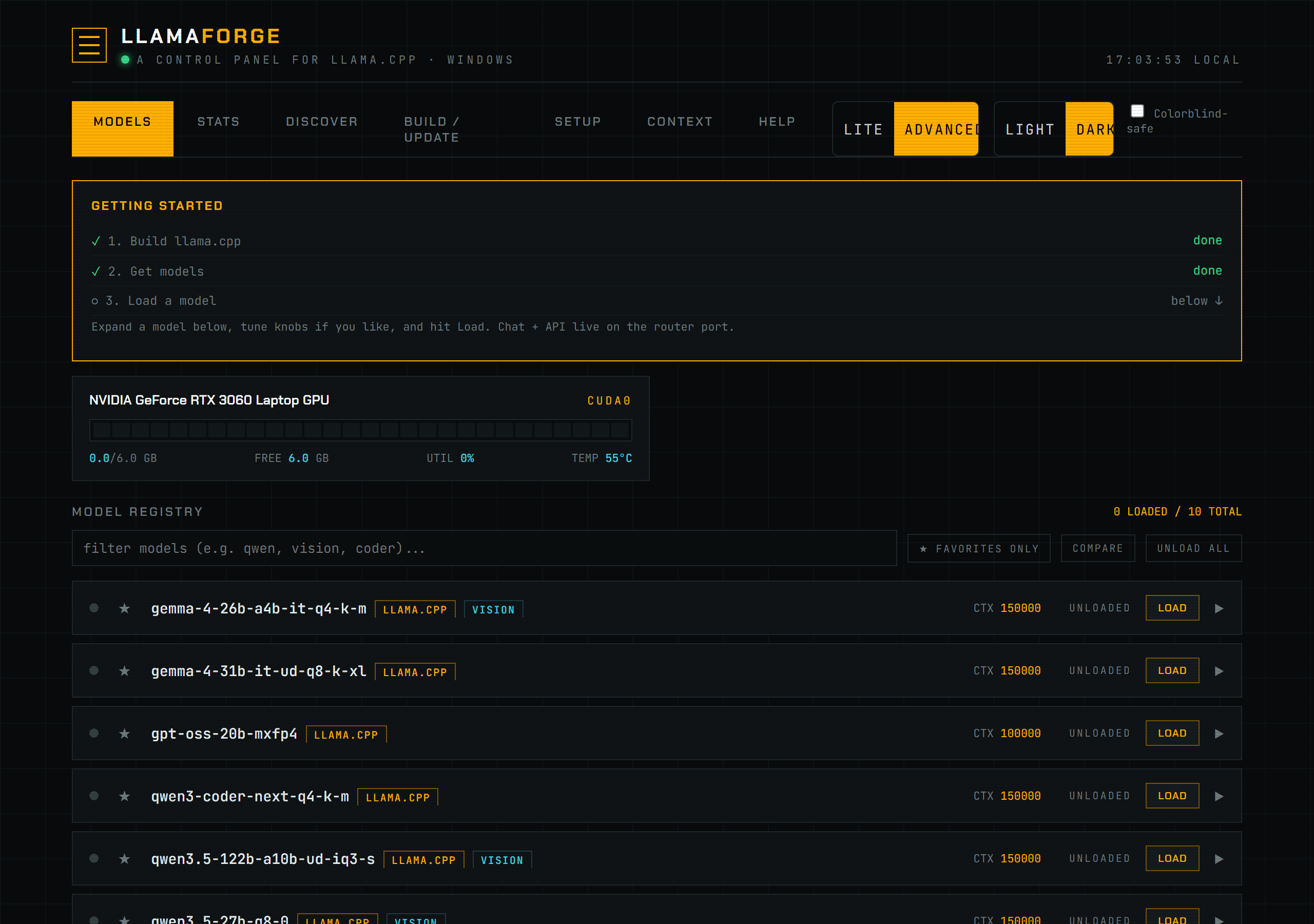
Each row in the Models list is a section of models.ini (or an auto-discovered model not yet added to it). Expanding a row opens a live knob editor built from the running llama-server binary's own --help output, so the available flags always match the binary you actually built — not a hardcoded list that can drift out of date across llama.cpp versions.
backend/argspec.py (build_schema()) runs <server_bin> --help, parses the column-aligned help text into typed, grouped knobs (bool, int, float, enum, path, string), and caches the result per (server_bin path, binary mtime) — the cache self-invalidates automatically if you repoint server_bin at a different binary or rebuild it (backend/server.py schema()). A handful of flags the router itself owns (host, port, model, hf-repo, and similar) are filtered out of the editor as RESERVED — they aren't safe to set per model.
The editor has two density levels, controlled by ui_mode in config.json:
- Lite shows a curated set of common knobs (
n-gpu-layers,ctx-size,cache-type-k/cache-type-v,flash-attn,batch-size,ubatch-size,threads,tensor-split,temp,top-p). - Advanced exposes every flag the binary reports via
--help, grouped under the section headers from the help text itself.
Because the flag count is entirely a function of your llama-server build, LlamaForge does not hardcode a number for it — it is whatever --help reports at the time the schema is built.
How to use it
- Open the Models tab and click a model's row to expand its editor.
- Set the knobs you want to override. Unset fields inherit from the
[*]global-defaults section ofmodels.ini. - Click Save + Reload. This writes the changed keys into the model's
models.inisection (config.set_keys()), and if the model is currently loaded, unloads it first, then tells the router to reload (router("/models?reload=1")) so the next load picks up the new settings — no dashboard or router restart required. - To reuse a set of knobs on other models, click Save current + in the preset bar to name the model's current settings as a preset. Click a saved preset chip on any other model's row to apply it (same save + reload path). Delete a preset with the
×on its chip.- To make a preset a model's default, click the ◉/○ dot on its chip to bind it (
POST /api/presets/bind). Binding writes the preset's knobs into that model's section now, and — the point of it — editing the preset later re-syncs every model bound to it. The bound chip is highlighted; clicking the dot again unbinds and leaves the knobs in place. Knobs you set by hand afterward still win, since they're written last.
- To make a preset a model's default, click the ◉/○ dot on its chip to bind it (
- To compare settings across models, click Compare above the model list, tick the checkbox on two or more rows, then open the comparison. The table lists every knob key any selected model has explicitly set and highlights cells that differ between models; a blank cell marked "inherit" means that model falls back to the
[*]default. - To auto-tune a model's knobs based on your hardware, use the Refine bar beside Presets: pick an intent (balanced / speed / context / coding), click Run, and it benchmarks candidates with real completion requests (~200 tokens each) and applies the fastest config. A results table shows tok/s per candidate and which was chosen.
- To remove a stale or unwanted llama.cpp entry, click Unregister. This unloads it if necessary and removes only its
models.inisection and preset binding; the GGUF file remains on disk. vLLM's separate Delete action still removes its managed WSL files.
Screenshot
Reference
| Concept | Source | Behavior |
|---|---|---|
| Live flag schema | backend/argspec.py build_schema() | Parses <server_bin> --help; cached by (server_bin, mtime); refreshes automatically after a rebuild or binary change. |
| Reserved flags | backend/argspec.py RESERVED | Router-owned flags (host, port, model, hf-repo, etc.) are excluded from the per-model editor. |
| Hot reload | POST /api/save (backend/server.py) | Writes knobs via config.set_keys(), unloads the model if running, then calls the router's /models?reload=1 so models.ini is re-read live. |
| Presets | POST /api/presets/save / /apply / /delete / /bind | Named knob sets stored in config.json's presets key; applying one follows the same save + reload path as a manual edit. Bind records the pairing in preset_bindings and materializes the preset into the model; re-saving a bound preset re-syncs every model using it. |
| Compare | Models tab, Compare toggle (web/js/models.js openCompare()) | Client-side diff of settings across two or more selected models; no separate endpoint. |
| Refine | Models tab, Refine bar (POST /api/autotune/refine) | Auto-generates knob recommendations for the selected intent, benchmarks candidates with real completion requests (~200 tokens), applies the fastest config. Results table shows tok/s per candidate. |
| UI density | ui_mode in config.json ("lite" / "advanced") | Lite = curated knob subset; advanced = the full parsed schema. |
| Unregister | POST /api/models/unregister | Removes a llama-family models.ini section after unloading it; never deletes its GGUF file. |
Troubleshooting
If the editor shows "Could not read knobs from llama-server --help", server_bin in config.json is missing, wrong, or the binary failed to run (missing DLLs is common on Windows). Fix the path from the Setup tab or config.json directly — the schema is retried automatically on the next open, no restart needed. If --help runs but returns no arguments, the help text format wasn't recognized; check the binary is actually llama-server and not a different tool.
See also models.ini Format for the on-disk file this editor writes to, and config.json Reference for server_bin and ui_mode.