Context Wiki
A working directory of markdown docs, grouped into named profiles, that you can push into a model's context automatically (proxy injection) or write once into an agent's own config file (export).
What it does
The wiki is a plain folder of .md files (backend/wiki.py, default <ROOT>/wiki, overridable via the wiki_dir config key). Each doc is a single markdown file; names are sanitized (_safe_name()) so a doc can never write or read outside that directory — no path separators, no ./...
Docs are grouped into profiles: a profile is a name plus an ordered list of doc filenames plus a description, stored in the wiki_profiles config key. compose(profile_name) turns a profile into one block of text: it reads each doc in the profile's list order, skips empty ones, and wraps each with a ## <doc-name-without-.md> heading before joining them with blank lines. compose() returns "" for an unknown or empty profile name — there is no error path, only no context.
Each model can have its own active profile (wiki_active, a {model_id: profile_name} map set via set_active()). active_profile(model_id) looks up that model's entry, or returns "" if none is set. This is the piece that makes injection per-model: two models can carry different context, or none at all.
There are two ways the composed text reaches an agent:
- Proxy injection. Every request that passes through LlamaForge's Anthropic shim (
/v1/messages, streaming and non-streaming) or its OpenAI-compatible proxy (/v1/chat/completions) is composed fresh from that request's model and active profile, then merged into the system prompt:_inject_anthropic_system()prepends the composed text to (or sets) the Anthropicsystemfield;_inject_openai_system()prepends it to the firstsystemmessage, or inserts a new one. Both helpers are a no-op and return the request body untouched whencompose()returns an empty string — no active profile means no system-prompt change, not an empty block. - Agent-file export.
export_agent_file(path, composed)writes the composed text into a target file (e.g.~/.claude/CLAUDE.md,~/.codex/AGENTS.md,~/.pi/AGENTS.md) inside a marker-delimited region:<!-- llamaforge:start -->...<!-- llamaforge:end -->. If those markers already exist in the file, only the text between them is replaced, so hand-written content above and below survives repeated exports. If they don't exist, the region is appended. Any pre-existing marker text inside a doc itself is defused (<!-- llamaforge:start -->becomes<!-- llamaforge start -->) so a doc body can't spoof the delimiters. Before any write, the original file is copied once to<path>.llamaforge.bak— the backup is write-once, so re-exporting never overwrites the true original.
How to use it
- Open the Context tab.
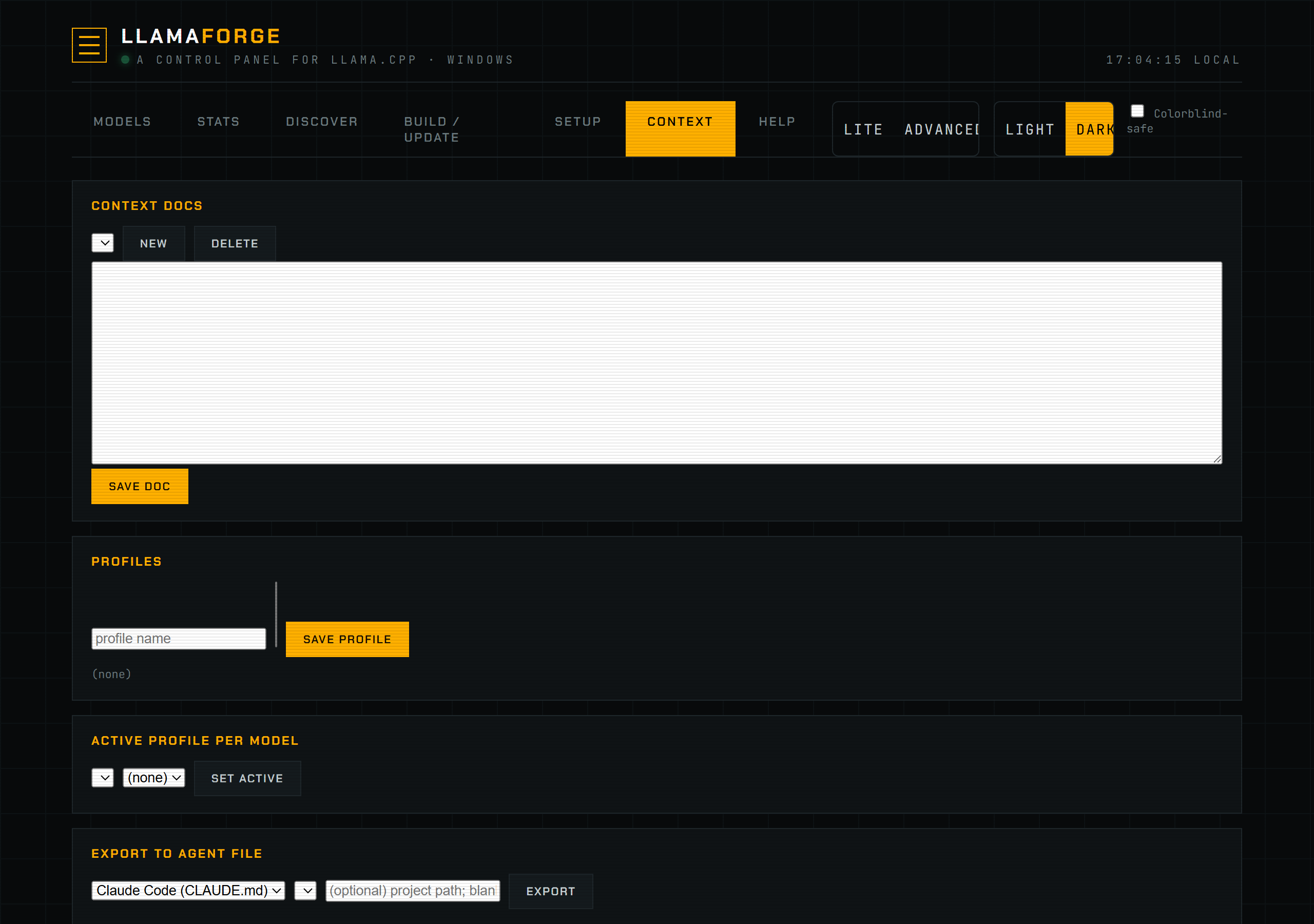
- Create or edit docs in the wiki panel — each is a markdown file you can write directly in the browser.
- Group docs into a profile: give it a name, an optional description, and pick which docs it includes (and their order —
compose()concatenates them in list order). - Set the active profile for a model from the model's context selector. Leaving it unset means that model gets no injected context.
- For agents that read the router or shim directly (any client hitting
/v1/messagesor/v1/chat/completions), the active profile's docs are injected automatically on every request — no further action needed. - For agents that read a static context file instead (Claude Code's
CLAUDE.md, Codex'sAGENTS.md, pi.dev'sAGENTS.md), use Export to write the composed profile into that file's marker region.
Screenshot
Reference
| Concept | Source | Behavior |
|---|---|---|
| Doc storage | backend/wiki.py _dir() / list_docs() / read_doc() / write_doc() / delete_doc() | Flat directory of .md files, default <ROOT>/wiki, overridable via wiki_dir config key. |
| Name safety | backend/wiki.py _safe_name() | Rejects names containing / or \, or equal to ./..; always resolves to a basename inside the wiki dir. |
| Profiles | backend/wiki.py get_profiles() / save_profile() / delete_profile() | Stored in config key wiki_profiles: {name: {docs: [...], description: ...}}. |
| Compose | backend/wiki.py compose(profile_name) | Joins each listed doc as ## <name>\n\n<text>, in profile order; skips blank docs; returns "" for unknown/empty profile. |
| Active selection | backend/wiki.py active_profile() / set_active() | Config key wiki_active, a {model_id: profile_name} map. |
| Anthropic injection | backend/server.py _inject_anthropic_system(), used by _anthropic_messages() and _anthropic_stream() | Prepends composed text to the Anthropic system field; no-op when composed text is empty. |
| OpenAI injection | backend/server.py _inject_openai_system(), used by the /v1/chat/completions handler | Prepends composed text to the first system message, or inserts one; no-op when composed text is empty. |
| Export | backend/wiki.py export_agent_file() | Marker-delimited region <!-- llamaforge:start --> / <!-- llamaforge:end -->; replaces the region if present, appends if not; backs up the original once to <path>.llamaforge.bak. |
Troubleshooting
If a model's requests don't seem to carry your wiki docs, confirm a profile is actually set active for that specific model id — activation is per-model, not global, and an unset model silently gets no injection. If export doesn't seem to change the target file, check that the file wasn't already up to date (re-exporting the same composed text replaces the marker region with identical content) and that <path>.llamaforge.bak was created next to it on first export.
See also Connect an Agent for the endpoints and one-click configs that route agents through the Anthropic shim or the router, and Theming & Accessibility for the dashboard's appearance settings.