Build & Update
Check whether your local llama.cpp checkout is behind upstream, and rebuild it with CMake flags auto-detected for your machine's GPU and CPU — without hand-typing cmake commands.
What it does
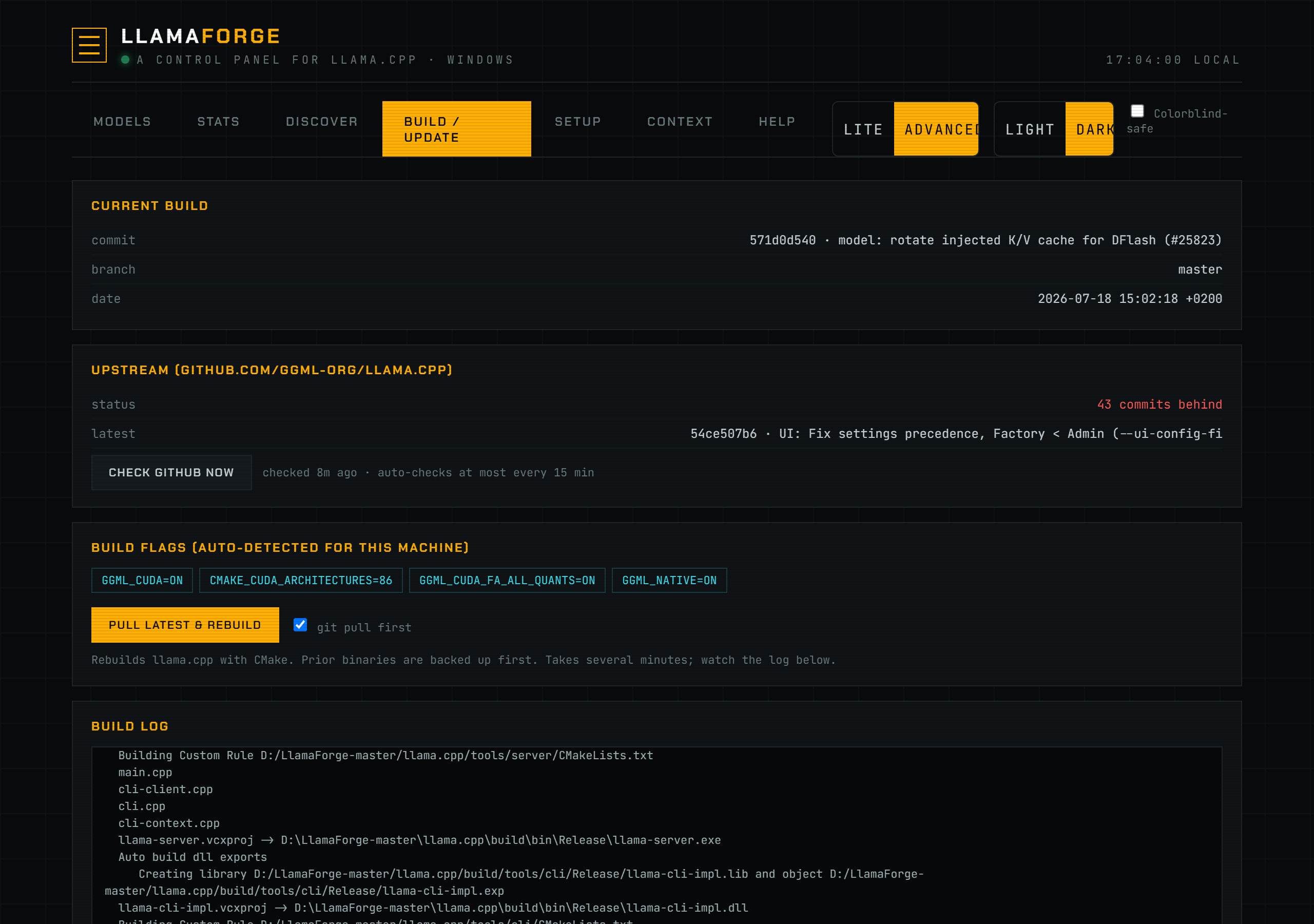
The Build tab reports two independent things: how your local llama_src checkout compares to upstream github.com/ggml-org/llama.cpp, and what CMake flags this machine should build with.
Current vs. upstream. backend/builder.py's BuildManager.current_commit() reads the local checkout's HEAD (git log -1) and branch. check_updates() runs git fetch --quiet origin against origin/master, then git rev-list --count HEAD..origin/master to report how many commits you're behind, plus the latest upstream commit's hash and subject. This check is cached for 15 minutes (UPDATE_TTL = 900 seconds) so opening the Build tab doesn't git fetch GitHub on every visit; a failed fetch is retried sooner (UPDATE_TTL_FAIL = 60 seconds). The Check GitHub now button bypasses the cache with force=1, and a finished build clears the cache outright so the next check is fresh.
Auto-detected build flags. backend/hardware.py's recommend() inspects your GPU(s) (via nvidia-smi, or Apple's unified memory on macOS) and CPU, then returns a dict of {cmake_flags, notes, runtime, gpus, cpu}:
- On macOS, it returns
GGML_METAL=ONandGGML_NATIVE=ON, with a note that Metal uses unified memory as VRAM. No CUDA branch runs on Mac. - If one or more NVIDIA GPUs are detected, it sets
GGML_CUDA=ON, and if compute capabilities were readable,CMAKE_CUDA_ARCHITECTURESto the sorted, deduplicated list of detected architectures (e.g.86;89). It also setsGGML_CUDA_FA_ALL_QUANTS=ONto enable flash attention across all quantized KV cache combinations. - If no NVIDIA GPU is detected, it configures a CPU-only build (no CUDA flags) and notes that fact.
- On Windows/Linux either way, it always sets
GGML_NATIVE=ON. If the CPU looks like it supports AVX-512 (avx512_hint— on Linux read from real CPU flags; on Windows a name-based heuristic for Ryzen 7/9 (7000- and 9000-series), Xeon, and Threadripper parts), it additionally setsGGML_AVX512=ON,GGML_AVX512_VNNI=ON,GGML_AVX512_VBMI=ON, andGGML_AVX512_BF16=ON. - It also returns a
runtimerecommendation (not a CMake flag, but a suggested per-model default):n-gpu-layers=99andflash-attn=onwhen a GPU (or Mac Metal) is present,n-gpu-layers=0andflash-attn=offon CPU-only machines.
These flags are shown as pills on the Build tab and used as the default for a rebuild; if you've previously saved custom flags (cmake_flags in config.json), those are shown instead until you clear them.
A rebuild (BuildManager.run_build()) runs in a background thread: it first validates that llama_src/build_dir are set and the source exists (an unset path is reported plainly instead of running cmake -B -S and surfacing CMake's own error), optionally git pull --ff-only origin, backs up the current binaries directory (bin/Release on Windows/MSVC, bin elsewhere) to a timestamped copy before touching anything, runs cmake -B <build_dir> -S <llama_src> -DCMAKE_BUILD_TYPE=Release with your flags, then cmake --build <build_dir> --config Release --parallel <jobs>. Output streams to a log file the dashboard polls live. On success it records where llama-server actually landed into config.json, so a first build doesn't leave you hand-fixing server_bin.
"Built, with warnings." cmake --build returns a single exit code for the whole build, so a failing non-essential target (the npm/sharp UI-asset step on Windows is the common one) used to be reported as a hard BUILD FAILED even though llama-server itself built. Now, if the build step fails but a freshly built llama-server is present (freshness proven by comparing its mtime to the build's start, so a stale binary from a previous build can't mask a real compile failure), the build is reported as built, with warnings — the binary is recorded and usable, and the failing step is left in the log for you to read. A build that produced no fresh binary is still a hard failure.
Two llama-family engines. The Build tab has a llama.cpp / ik_llama target toggle. Building the ik_llama target uses its own ik_llama_src / ik_llama_build_dir / ik_llama_cmake_flags and produces a separate binary. A Switch engine control (POST /api/engine/switch) points the router at the chosen engine by setting active_engine. The switch is gated on a capability probe (router_ctl.supports_router_mode()): because LlamaForge drives the router as <server_bin> --models-preset ..., a binary whose llama-server predates router mode is refused with an explanation rather than being switched to and taking the router down. Each engine reads its own models.ini (ik_llama uses a -ikllama sibling), and the knob editor reflects whichever engine is active.
How to use it
- Open the Build tab. Current Build shows your checkout's commit, branch, and date; Upstream shows whether you're behind
origin/masterand by how many commits. - Click Check GitHub now to force a fresh upstream check instead of waiting for the 15-minute cache.
- Review the Build Flags pills — these are auto-detected for your GPU/CPU (or your previously saved custom flags, if any).
- Leave git pull first checked (it's checked by default when you're behind) to pull the latest commits before building, or uncheck it to rebuild the current checkout as-is.
- Click Pull latest & Rebuild (or Rebuild current if already up to date). The build runs in the background; watch progress and any errors in the Build Log panel below, which polls live until the build finishes or fails.
- If vLLM is installed, the same tab shows its installed vs. latest PyPI version, with an Update vLLM button when a newer release is available.
Screenshot
Reference
| Concept | Source | Behavior |
|---|---|---|
| Current commit | BuildManager.current_commit() | git log -1 (hash, subject, date) + current branch on llama_src. |
| Upstream check | BuildManager.check_updates() | git fetch + git rev-list --count HEAD..origin/master; cached 15 min (60s on failure), bypassed with force=1. |
| Recommended flags | hardware.recommend() | Returns cmake_flags, human-readable notes, a runtime suggestion, and the detected gpus/cpu. |
| macOS flags | hardware.recommend() | GGML_METAL=ON, GGML_NATIVE=ON. |
| NVIDIA GPU flags | hardware.recommend() | GGML_CUDA=ON, CMAKE_CUDA_ARCHITECTURES=<archs> (if readable), GGML_CUDA_FA_ALL_QUANTS=ON. |
| CPU-only flags | hardware.recommend() | No CUDA flags; GGML_NATIVE=ON still set. |
| AVX-512 flags | hardware.recommend() | GGML_AVX512, GGML_AVX512_VNNI, GGML_AVX512_VBMI, GGML_AVX512_BF16 — all ON when avx512_hint is true. |
| Runtime suggestion | hardware.recommend()["runtime"] | n-gpu-layers=99, flash-attn=on with a GPU/Metal; n-gpu-layers=0, flash-attn=off CPU-only. |
| Rebuild | BuildManager.run_build() | Validates paths, optional git pull --ff-only, backs up prior binaries, cmake configure + build (Release, parallel jobs = CPU count by default), records the built server_bin. |
| Partial success | BuildManager.run_build() | Build-step failure with a fresh llama-server present → done_warnings (amber "built with warnings"); no fresh binary → hard failed. |
| Engine target / switch | Build tab toggle, POST /api/engine/switch | Builds llama.cpp or ik_llama; switching sets active_engine, refused if the target binary has no router mode. |
Troubleshooting
If the upstream status shows "check failed," git fetch couldn't reach GitHub (network issue, or llama_src isn't a valid checkout) — check llama_src in config.json points at a real git clone. If a build fails, the Build Log panel shows the failing cmake step's output; prior binaries are always backed up first (to a bin-backup-<timestamp> folder next to the build output) so a bad build doesn't leave you without a working server. If flag detection looks wrong (e.g. no GPU found on a machine that has one), verify nvidia-smi is on PATH and reports the GPU — hardware.detect_gpus() shells out to it directly.
See also Models & Tuning for the flags the resulting llama-server binary exposes, and config.json Reference for llama_src, build_dir, server_bin, and cmake_flags.